

Go Functions
We use functions to divide our code into smaller chunks to make our code looks clean and easier to understand.
Basically, a function is a block of code that performs a specific task. For example, suppose we want to write code to create a circle and rectangle and color them.
In this case, we can organize our code by creating three different functions:
- function to create a circle
- function to create a rectangle
- function to color
This way, our code will look more organized. Also, we can reuse the same function to color the circle and rectangle. Hence, providing the benefits of code reusability.
Create a Go Function
In Golang, we use the func keyword to create a function.
Here, greet() is the name of the function (denoted by ()) and code inside {....} indicates the function body.
Let's now create a function that prints Good Morning.
When we run this program, we will not get the output.
This is because we are just defining a function. To execute a function, we need to call it first.
Function Call
We use the function's name followed by parenthesis to call a function.
Now, let's add a function call inside main().
Output
This time the function runs, and we get Good Morning as output.
Example: Golang Function
Output
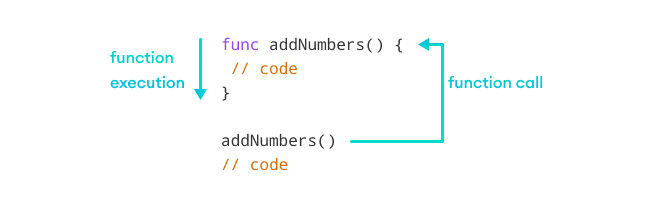
In the above example, we have created a function named addNumbers(). The function adds two numbers and prints the sum.
Here's how the program works:
Function Parameters in Golang
In our last example, we have created a function that does a single task, adds two numbers, 12 and 8.
However, in real projects, we want our functions to work dynamically. That is, instead of adding 12 and 8, the addNumbers() function should be able to add any two numbers.
In this case, we can create functions that accept external values and perform operations on them. These additional parameters are known as function parameters.
Define Function with Parameters
Here's how we can create a function with parameters:
Now, the addNumbers() function accepts two parameters: n1 and n2. Here, int denotes that both parameters are of integer type.
To call this function, we need to pass some values (known as function arguments).
Here, 21 and 13 are the function arguments that are passed to the addNumbers() function.
Example: Function Parameters
Output
Here's how the program works:
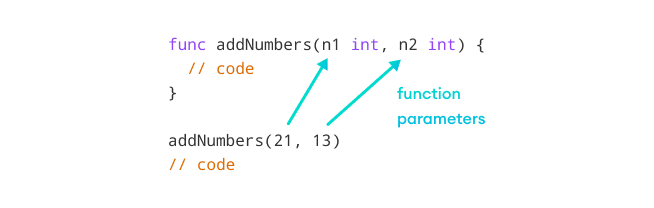
The arguments are assigned to the function parameters when we call the function. 21 is assigned to n1 and 13 is assigned to n2.
That's why when we add n1 and n2 inside the function, we get 34 (21 + 13).
The function parameter data type should always match the data passed during the function call. Here, the data type of n1 and n2 is int, so we have passed integer values 21 and 13during a function call.
Return Value from Go Function
In our last example, we have printed the value of the sum inside the function itself. However, we can also return value from a function and use it anywhere in our program.
Here's how we can create a Go function that returns a value:
Here, int before the opening curly bracket { indicates the return type of the function. In this case, int means the function will return an integer value.
And return sum is the return statement that returns the value of the sum variable.
The function returns value to the place from where it is called, so we need to store the returned value to a variable.
Here, we are storing the returned value to the result variable.
Example: Function Return Value
Output
In the above example, when the return statement is encountered, it returns the value of sum. The returned value is assigned to the result variable inside main().
Here's how the program works.
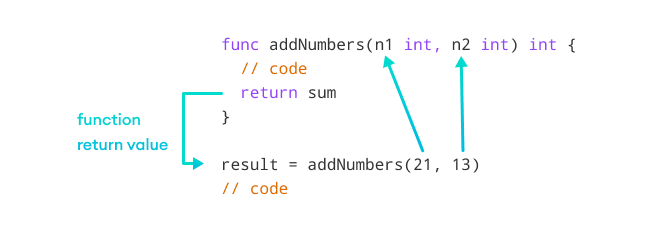
The return statement should be the last statement of the function. When a return statement is encountered, the function terminates.
Let's see an example,
We get a "missing return at the end of function" error as we have added a line after the return statement.
Return Multiple Values from Go Function
In Go, we can also return multiple values from a function. For example,
Output
In the above example, we have created a function named calculate().
Here, (int, int) indicates that we are returning two integer values: sum and difference from the function.
Since the function returns two values, we have used two variables while calling the function.
Benefits of Using Functions
Here are the benefits of using a function in programming:
1. Code Reusability
We can reuse the same function multiple times in our program. For example,
Output
In the above program, we have created the function named getSquare() to calculate the square of a number.
Here, we are reusing the same function multiple times to calculate the square of different numbers.
2. Code Readability
Functions help us break our code into chunks to make our program readable and easy to understand. It also makes the code easier to maintain and debug.