

Go Print Statement
We use these three functions to print output messages in Go programming.
-
fmt.Print()
-
fmt.Println()
-
fmt.Printf()
!!! Note All these functions are defined under the fmt package. So, we must import the fmt package before we can use these functions.
Go fmt.Print()
Let's take an example.
Output
Here, the fmt.Print() function prints the content inside parentheses ().
Print Variables
Here's how we print variables in Go programming.
Output
!!! Note We must not wrap variables inside quotation marks while printing. Otherwise, it's considered as a string.
Printing Multiple Values At Once
We can print multiple values and variables at once by separating them with commas. For example,
Output
Go fmt.Println()
The way fmt.Println() works is similar to how fmt.Print() works with a couple of differences.
-
fmt.Println() prints a new line at the end by default.
-
If we print multiple values and variables at once, a space is added between the values by default.
Output
Things to notice
-
All the output messages are printed in separate lines
-
A space is added after Current Salary: by default
Go fmt.Printf()
The fmt.Printf() function formats the strings and sends them to the screen. Let's see an example.
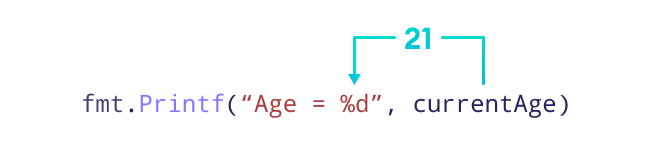
Here, the fmt.Printf() function replaces the %d with the value of currentAge.
By the way, %d is a format specifier that replaces integer variables with their values.
In Go, every data type has a unique format specifier.
| Data Type | Format Specifier |
|---|---|
| integer | %d |
| float | %g |
| string | %s |
| bool | %t |
Example: Using %g to print Float Values
Output
Here, fmt.Printf() converts the "Annual Salary: %g" string to "Annual Salary: 65000.5".
Example: Using format specifiers to hold value of a variable
A format string may also have multiple format specifiers.
Output
Here's how this code works:

Printing Without Package
It's also possible to print output without using the fmt package. For that, we use print() and println(). For example,
Output
Here, we have used println() and print() instead of fmt.Println() and fmt.Print() respectively.
It's recommended to use the fmt package for printing. We usually use println(), print() only for debugging purposes. To learn more, visit fmt.Println() Vs println() in Go programming.